Naver Movie Ranking
1. 사이트 분석
- https://movie.naver.com/
- 영화랭킹 탭 이동
- 영화랭킹에서 평점순(현재상영영화) 선택

- 주소의 규칙 발견 -> 날짜 정보를 변경해주면 해당 페이지 접근 가능
requirements
# requirements

import pandas as pd
from urllib.request import urlopen
from bs4 import BeautifulSoup
url = "https://movie.naver.com/movie/sdb/rank/rmovie.naver?sel=cur&date=20230130"
response = urlopen(url)
# response.status => 200
soup = BeautifulSoup(response, "html.parser")
print(soup.prettify())

=>

<!DOCTYPE html>
<html lang="ko">
 <head>
  <meta content="text/html; charset=utf-8" http-equiv="Content-Type"/>
  <meta content="IE=edge" http-equiv="X-UA-Compatible"/>
  <meta content="http://imgmovie.naver.com/today/naverme/naverme_profile.jpg" property="me2:image">
   <meta content="네이버영화 " property="me2:post_tag">
    <meta content="네이버영화" property="me2:category1"/>

...
  </div>
 </body>
</html>
영화 제목 태그
soup.find_all("div", "tit5") # soup.select("div.tit5")

=>

[<div class="tit5">
 <a href="/movie/bi/mi/basic.naver?code=223800" title="더 퍼스트 슬램덩크">더 퍼스트 슬램덩크</a>
 </div>,
 <div class="tit5">
 <a href="/movie/bi/mi/basic.naver?code=130850" title="주토피아">주토피아</a>
 </div>,
 <div class="tit5">
 <a href="/movie/bi/mi/basic.naver?code=10001" title="시네마 천국">시네마 천국</a>
 </div>,
...
 <a href="/movie/bi/mi/basic.naver?code=184513" title="교섭">교섭</a>
 </div>,
 <div class="tit5">
 <a href="/movie/bi/mi/basic.naver?code=212099" title="강남좀비">강남좀비</a>
 </div>]
soup.find_all("div", "tit5")[0].a.string
# soup.select("div.tit5")[0].find("a").text
# soup.select(".tit5")[0].select_one("a").get_text()

=>

'더 퍼스트 슬램덩크'
영화 평점 태그
soup.find_all("td", "point") # soup.select(".point")

=>

[<td class="point">9.50</td>,
 <td class="point">9.36</td>,
...
 <td class="point">7.12</td>,
 <td class="point">6.88</td>,
 <td class="point">6.82</td>,
 <td class="point">6.14</td>,
 <td class="point">2.83</td>]
len(soup.find_all("td", "point")), len(soup.find_all("div", "tit5"))

=>

(47, 47)
soup.find_all("td", class_="point")[0].text # soup.select("td.point")[0].string

=>

'9.50'
영화제목 리스트
end = len(soup.find_all("div", "tit5"))

movie_name = []

# for n in range(0, end):
#     movie_name.append(
#         soup.find_all("div", "tit5")[n].a.string
#     )
movie_name = [soup.select(".tit5")[n].a.text for n in range(0, end)]

movie_name

=>

['더 퍼스트 슬램덩크',
 '주토피아',
 '시네마 천국',
...
 '더 메뉴',
 '유령',
 '원피스 필름 레드',
 '교섭',
 '강남좀비']
영화평점 리스트
end = len(soup.find_all("td", "point"))

movie_point = [soup.find_all("td", "point")[n].string for n in range(0, end)]
movie_point

=>

['9.50',
 '9.36',
 '9.33',
 '9.33',
 '9.32',
...
 '7.12',
 '6.88',
 '6.82',
 '6.14',
 '2.83']
전체 데이터 수 확인
len(movie_name), len(movie_point)

=>

(47, 47)
2. 자동화를 위한 코드
- 날짜 변경을 통해 원하는 기간만큼 데이터 추출
```py
date = pd.date_range(“2022.10.23”, periods=100, freq=”D”)
date
=>
DatetimeIndex([‘2022-10-23’, ‘2022-10-24’, ‘2022-10-25’, ‘2022-10-26’,
‘2022-10-27’, ‘2022-10-28’, ‘2022-10-29’, ‘2022-10-30’,
.
.
.
‘2023-01-23’, ‘2023-01-24’, ‘2023-01-25’, ‘2023-01-26’,
‘2023-01-27’, ‘2023-01-28’, ‘2023-01-29’, ‘2023-01-30’],
dtype=’datetime64[ns]’, freq=’D’)
```py
import time
from tqdm import tqdm

movie_date = []
movie_name = []
movie_point = []

for today in tqdm(date):
    url = "https://movie.naver.com/movie/sdb/rank/rmovie.naver?sel=cur&date={date}"
    response = urlopen(url.format(date=today.strftime("%Y%m%d")))
    soup = BeautifulSoup(response, "html.parser")

    end = len(soup.find_all("td", "point"))

    movie_date.extend([today for _ in range(end)])
    movie_name.extend([soup.select("div.tit5")[n].find("a").get_text() for n in range(end)])
    movie_point.extend([soup.find_all("td", "point")[n].string for n in range(end)])

    time.sleep(0.5)

=>

100%|██████████| 100/100 [02:21<00:00,  1.42s/it]
movie = pd.DataFrame({
    "date": movie_date,
    "name": movie_name,
    "point": movie_point
})
movie.tail()
|
date |
name |
point |
| 4591 |
2023-01-30 |
더 메뉴 |
7.12 |
| 4592 |
2023-01-30 |
유령 |
6.88 |
| 4593 |
2023-01-30 |
원피스 필름 레드 |
6.82 |
| 4594 |
2023-01-30 |
교섭 |
6.14 |
| 4595 |
2023-01-30 |
강남좀비 |
2.83 |
movie.info()

=>

<class 'pandas.core.frame.DataFrame'>
RangeIndex: 4596 entries, 0 to 4595
Data columns (total 3 columns):
 #   Column  Non-Null Count  Dtype
---  ------  --------------  -----
 0   date    4596 non-null   datetime64[ns]
 1   name    4596 non-null   object
 2   point   4596 non-null   object
dtypes: datetime64[ns](1), object(2)
memory usage: 107.8+ KB
movie["point"] = movie["point"].astype(float)
movie.info()

=>

<class 'pandas.core.frame.DataFrame'>
RangeIndex: 4596 entries, 0 to 4595
Data columns (total 3 columns):
 #   Column  Non-Null Count  Dtype
---  ------  --------------  -----
 0   date    4596 non-null   datetime64[ns]
 1   name    4596 non-null   object
 2   point   4596 non-null   float64
dtypes: datetime64[ns](1), float64(1), object(1)
memory usage: 107.8+ KB
데이터 저장
movie.to_csv(
    "../data/03. naver_movie_data.csv", sep=",", encoding="utf-8"
)
3. 영화 평점 데이터 정리
requirements
import numpy as np
import pandas as pd
movie = pd.read_csv("../data/03. naver_movie_data.csv", index_col=0)
movie.tail()
|
date |
name |
point |
| 4591 |
2023-01-30 |
더 메뉴 |
7.12 |
| 4592 |
2023-01-30 |
유령 |
6.88 |
| 4593 |
2023-01-30 |
원피스 필름 레드 |
6.82 |
| 4594 |
2023-01-30 |
교섭 |
6.14 |
| 4595 |
2023-01-30 |
강남좀비 |
2.83 |
- 인덱스 : 영화 이름
- 점수 합산
- 100일 간 네이버 영화 평점 합산 기준 베스트 & 워스트 10 선정
pivot table
movie_unique = pd.pivot_table(data=movie, index="name", aggfunc=np.sum)
movie_unique
|
point |
| name |
|
| 120BPM |
19.39 |
| 3000년의 기다림 |
126.96 |
| 강남좀비 |
14.17 |
| 거북이는 의외로 빨리 헤엄친다 |
172.62 |
| 겨울왕국 |
109.44 |
| ... |
... |
| 헤어질 결심 |
867.05 |
| 혼자 사는 사람들 |
88.77 |
| 홀리 모터스 |
127.14 |
| 화양연화 |
114.40 |
| 환절기 |
106.21 |
movie_best = movie_unique.sort_values(
    by="point", ascending=False # 내림차순
)
movie_best.head()
|
point |
| name |
|
| 극장판 주술회전 0 |
922.82 |
| 너의 이름은. |
881.00 |
| 코다 |
867.66 |
| 헤어질 결심 |
867.05 |
| 라라랜드 |
853.83 |
tmp = movie.query("name == ['헤어질 결심']")
tmp
|
date |
name |
point |
| 25 |
2022-10-23 |
헤어질 결심 |
8.68 |
| 78 |
2022-10-24 |
헤어질 결심 |
8.68 |
| 126 |
2022-10-25 |
헤어질 결심 |
8.68 |
| 177 |
2022-10-26 |
헤어질 결심 |
8.68 |
| 227 |
2022-10-27 |
헤어질 결심 |
8.67 |
| ... |
... |
... |
... |
| 4378 |
2023-01-26 |
헤어질 결심 |
8.64 |
| 4429 |
2023-01-27 |
헤어질 결심 |
8.64 |
| 4478 |
2023-01-28 |
헤어질 결심 |
8.64 |
| 4526 |
2023-01-29 |
헤어질 결심 |
8.64 |
| 4572 |
2023-01-30 |
헤어질 결심 |
8.64 |
시각화
requirements
import matplotlib.pyplot as plt
from matplotlib import rc

rc("font", family="malgun gothic")
%matplotlib inline
# get_ipython().run_line_magic("matplotlib", "inline")
plt.figure(figsize=(20, 8))
plt.plot(tmp["date"], tmp["point"]) # 선 그래프, x축 : 날짜, y축 : 평점 -> 날짜에 따른 평점 변화를 선그래프로 표현(시계열)
plt.title("날짜별 평점")
plt.xlabel("날짜")
plt.ylabel("평점")
plt.xticks(rotation="vertical")
plt.legend(labels=["평점 추이"], loc="best")
plt.grid(True)
plt.show()
상위 10개 영화
|
point |
| name |
|
| 극장판 주술회전 0 |
922.82 |
| 너의 이름은. |
881.00 |
| 코다 |
867.66 |
| 헤어질 결심 |
867.05 |
| 라라랜드 |
853.83 |
| 비긴 어게인 |
840.72 |
| 에브리씽 에브리웨어 올 앳 원스 |
706.31 |
| 사랑할 땐 누구나 최악이 된다 |
703.74 |
| 날씨의 아이 |
701.31 |
| 너의 췌장을 먹고 싶어 |
653.11 |
하위 10개 영화
|
point |
| name |
|
| 컴백홈 |
21.68 |
| 120BPM |
19.39 |
| 연애의 기술 |
17.84 |
| 리스본행 야간열차 |
16.62 |
| 이상한 나라의 수학자 |
16.40 |
| 남영동1985 |
14.48 |
| 강남좀비 |
14.17 |
| 어린 의뢰인 |
9.06 |
| 접속 |
8.67 |
| 미니언즈2 |
7.69 |
movie_pivot = pd.pivot_table(data=movie, index="date", columns="name", values="point")
movie_pivot.head()
| name |
120BPM |
3000년의 기다림 |
강남좀비 |
거북이는 의외로 빨리 헤엄친다 |
겨울왕국 |
겨울왕국 2 |
고속도로 가족 |
공동경비구역 JSA |
공조2: 인터내셔날 |
광대: 소리꾼 |
... |
피아니스트의 전설 |
하우스 오브 구찌 |
한산: 용의 출현 |
해피 투게더 |
헌트 |
헤어질 결심 |
혼자 사는 사람들 |
홀리 모터스 |
화양연화 |
환절기 |
| date |
|
|
|
|
|
|
|
|
|
|
|
|
|
|
|
|
|
|
|
|
|
| 2022-10-23 |
NaN |
NaN |
NaN |
NaN |
NaN |
NaN |
NaN |
NaN |
8.59 |
NaN |
... |
NaN |
NaN |
8.76 |
9.19 |
8.38 |
8.68 |
NaN |
NaN |
8.8 |
8.17 |
| 2022-10-24 |
NaN |
NaN |
NaN |
NaN |
NaN |
NaN |
NaN |
NaN |
8.59 |
NaN |
... |
NaN |
NaN |
8.76 |
9.19 |
8.38 |
8.68 |
NaN |
NaN |
8.8 |
8.17 |
| 2022-10-25 |
NaN |
NaN |
NaN |
NaN |
NaN |
NaN |
NaN |
NaN |
8.58 |
NaN |
... |
NaN |
NaN |
8.76 |
9.19 |
8.38 |
8.68 |
NaN |
NaN |
8.8 |
8.17 |
| 2022-10-26 |
NaN |
NaN |
NaN |
NaN |
NaN |
NaN |
NaN |
NaN |
8.58 |
NaN |
... |
NaN |
NaN |
8.76 |
9.19 |
8.38 |
8.68 |
NaN |
NaN |
8.8 |
8.17 |
| 2022-10-27 |
NaN |
NaN |
NaN |
NaN |
NaN |
NaN |
NaN |
NaN |
8.58 |
NaN |
... |
NaN |
NaN |
8.76 |
9.19 |
8.38 |
8.67 |
NaN |
NaN |
8.8 |
8.17 |
movie_pivot.to_excel("../data/03. movie_pivot.xlsx")
import platform
import seaborn as sns
from matplotlib import font_manager, rc
path = "C:/Windows/Fonts/malgun.ttf"

if platform.system() == "Darwin":
    rc("font", family="Arial Unicode MS")
elif platform.system() == "Windows":
    font_name = font_manager.FontProperties(fname=path).get_name()
    rc("font", family=font_name)
else:
    print("Unknows system. sorry")
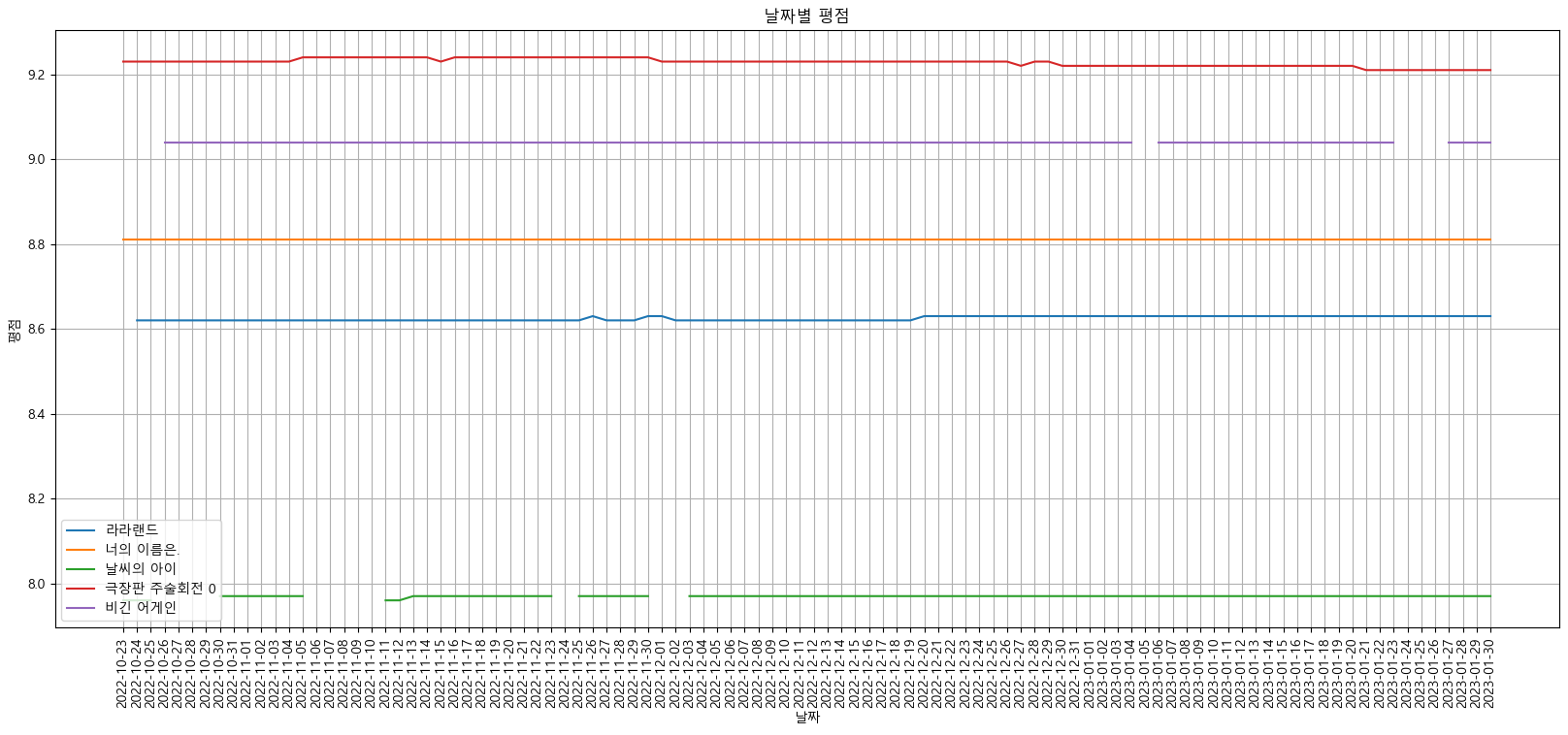
target_col = ['라라랜드', '너의 이름은.', '날씨의 아이', '극장판 주술회전 0', '비긴 어게인']
plt.figure(figsize=(20, 8))
plt.title("날짜별 평점")
plt.xlabel("날짜")
plt.ylabel("평점")
plt.xticks(rotation=("vertical"))
plt.tick_params(bottom="off", labelbottom="off")
plt.plot(movie_pivot[target_col])
plt.legend(target_col, loc="best")
plt.grid(True)
plt.show()